

The Challenge
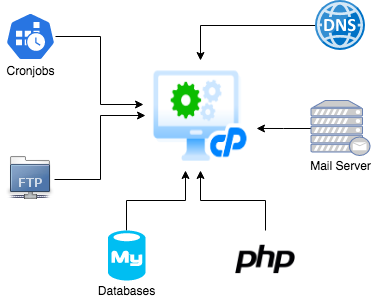
If you don’t know Cpanel, think of it as an all-in-one open-source box. Cpanel is a powerful hosting server with built-in services such as Apache, PHP, Mysql, and Named for DNS. It allows you to create customised hosting packages and host customers over them. Usually, it’s well suited to small customers. The biggest challenge starts when you put more and more load within the same box.
What about a scenario where you don’t have a single hosting package although you have built your solution years ago over Cpanel APIs? These APIs are used to provision email accounts, FTP users, DNS records, and so on.
You would end up with an infrastructure design like this:
Even though you have a big server to handle all the workloads, what happens if the server goes down? And if you have that server hosted in a third-party data center? You would have to raise a ticket and wait for their answer. Meaning a big downtime ahead.
The Solution
Since decoupling services and applications into micro-services is a complex and long process, the fastest solution was to lift and shift the server to a similar Cpanel server on an EC2 instance.
That choice gave time to the developer teamwork on the overwhelming applications while allowing some standard applications to be pushed to the Cloud.
Previously, all the PHP Laravel APIs running on that box were modernised to docker images and deployed on ECS.
Check it out our open-source terraform ECS cluster module:
https://github.com/DNXLabs/terraform-aws-ecs
And our module to deploy ECS applications such as PHP Laravel:
https://github.com/DNXLabs/terraform-aws-ecs-app
If you want to find out more about application modernisation for PHP, Node, Ruby, etc, check out our website:
https://dnx.solutions/application-modernisation
Phase 1 – Decoupling the most overwhelming Cpanel services
DNS to Route 53:
Dumping all Route 53 records from a Cpanel server is a pain in the neck. Why’s that? Because Cpanel usually creates a lot of ‘useless’ records if you’re creating a single domain or subdomain.
We managed to have all the DNS records and values and we’ve created all of them on Route 53.
There is no simple way to dump the DNS records on Cpanel. Be aware of that.
Mysql to RDS:
The databases on Cpanel are created with a strange prefix to avoid duplication. We’ve got a dump of all databases, and using the python script below, we ran a 40 or so parallel syncs to restore all databases:
https://github.com/DNXLabs/tools-box/blob/master/scripts/parallel-script/parallel_db_restore.py
Phase 1 final design:
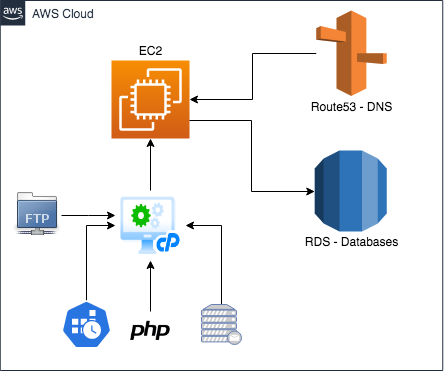
Now we have a server running on AWS and at least some ways to handle the forthcoming problems.
Right now, the solution is not yet finalised, so stay tuned for our next posts where we will update you with the next stages of this migration.
To Be Continued…
At DNX Solutions, we work to bring a better cloud and application experience for digital-native companies in Australia.
Our current focus areas are AWS, Well-Architected Solutions, Containers, ECS, Kubernetes, Continuous Integration/Continuous Delivery and Service Mesh.
We are always hiring cloud engineers for our Sydney office, focusing on cloud-native concepts.
Check our open-source projects at https://github.com/DNXLabs and follow us on Twitter, Linkedin or Facebook.